
Aeron Cluster Standby
Overview
Aeron Cluster Standby brings improved availability, disaster recovery, and load management to your Aeron applications. It provides elevated capabilities of resilience and redundancy to critical systems, ensuring high availability and fault tolerance at all times, thus minimizing the impact of failures or outages on daily operations.
Cluster Standby is a variation on a consensus module node that is able to receive a stream of log data from an existing cluster and use it to drive a suite of clustered service nodes. However, the Standby Cluster nodes will not participate in Cluster’s distributed consensus algorithm (e.g. it won’t vote in a leader election) nor will it apply back-pressure to the log on the main cluster. This deployment option provides a number of interesting features:
-
A warm standby DR where log data can be replicated to another region/data center and can be used to seed a fresh cluster quickly and efficiently (i.e. without a log replay).
-
Running additional services that would normally be to slow to run in the live cluster, e.g. a query service, or persistent egress.
-
Daisy-chaining, where a Cluster Standby node can retrieve its log information from another Cluster Standby.
-
Provide a location to perform background snapshots that don’t stop the cluster.
How to get Cluster Standby
Cluster Standby is a Premium Aeron component. The binaries are accessible from the Adaptive Artifactory.
-
aeron-cluster-standby - main module.
<groupId>io.aeron.premium.standby</groupId> <artifactId>aeron-cluster-standby</artifactId> -
aeron-cluster-standby-samples - code samples.
<groupId>io.aeron.premium.standby</groupId>
<artifactId>aeron-cluster-standby-samples</artifactId>
Samples
For some sample code showing how this can work, look at TransitionClusterSample.java and
ClusterWithStandby.java in the aeron-cluster-standby-samples sources jar.
Configuration for Warm DR Setup

Let’s look a typical DR style setup for a group of Cluster Standby
nodes. We have a cluster formed by node-a node-b and node-c. These
will all be running instances of the Consensus Module, one or more
Clustered Services containers and an Archive. Obviously, all nodes will
be running a Media Driver. For the purposes of this, we are going to
look at how we configure node-d which is a Cluster Standby connected
directory to the cluster and node-e which is daisy-chained from
node-d. The remaining node-f will be used to provide a third node
for new cluster when failing over. Its configuration can closely follow
node-d or node-e depending on the level of redundancy required. With
regard to clusterMemberId, we will use the following assignments:
| Node | clusterMemberId |
|---|---|
node-a |
0 |
node-b |
1 |
node-c |
2 |
node-d |
3 |
node-e |
4 |
node-f |
5 |
-
channel-awill carry the backup queries sent from the standby node to the cluster. Backup queries are how the standby nodes discovery the configuration of the cluster, e.g. archive endpoints for replay. Authentication information including challenge responses will go via this channel. -
channel-bwill carry responses to the backup queries as well as authentication challenges. -
channel-cis the replay channel used to receive log data from the archive. -
channel-dis similar tochannel-ain that it carries the same backup query requests, but these from one standby to another when daisy-chaining Cluster Standby nodes. -
channel-eis for the backup query responses from standbys. -
channel-fis the control channel for the standby archive. -
channel-gis the replay channel used to move log data between standbys.
The key information in this configuration section the application of the
appropriate hosts, values like the port part of the endpoint
configuration have been given as examples and vary depending on your
environment. The exception here will be the use of port 0 to indicate
where a system assigned ephemeral port can be used. This documentation
will focus on the configuration of the endpoints used for communication.
Please see the sample support code to configure the rest of the options.
Main Cluster node-a, node-b, node-c
This is the main place where the configuration of the cluster nodes and the standby nodes overlap. The remaining configuration options for the main cluster have been left out for brevity.
API
final String clusterMembers =
    "0,node-a:20000,node-a:20001,node-a:20002,node-a:20003,node-a:20004|" +
    "1,node-b:20100,node-b:20101,node-b:20102,node-b:20103,node-b:20104|" +
    "2,node-c:20200,node-c:20201,node-c:20202,node-c:20203,node-c:20204|";

final ConsensusModule.Context context = new ConsensusModule.Context()
.clusterMembers(clusterMembers);Standby: node-d
This configuration will be specific to the nodes connecting directly to
the cluster, in this case node-d.
-
We need to set the
clusterConsensusEndpoints, this will manage the endpoints forchannel-a, this is a comma-separated list of endpoints so that it can handle some faults within the cluster. -
We then need to set the
responseEndpoint. This is the endpoint for return flow back to the standby onchannel-b(backup responses) andchannel-c(cluster log replay). Note that the host name matches the name of the current node, this must resolve to an address that is bound to the local node, but is also reachable from the main cluster. Port0can be used here to have an ephemeral port be selected by the system. -
The
standbyConsensusEndpointis used forchannel-dwhich will receive backup query requests from other standbys. This must resolve to a locally bound address that is reachable from the other standby nodes. -
The
standbyArchiveEndpointis used forchannel-fwhich will archive control requests from other standbys. This must resolve to a locally bound address that is reachable from the other standby nodes. It should match the endpoint used in theArchive.controlChannelon the same node.
API
final ClusterStandby.Context context = new ClusterStandby.Context()
    .clusterConsensusEndpoints("node-a:20001,node-b:20101,node-c:20201")
    .clusterMemberId(3)
    .responseEndpoint("node-d:0")
    .standbyConsensusEndpoint("node-d:20301")
    .standbyArchiveEndpoint("node-d:20304")
    .responseEndpoint;
Properties
aeron.cluster.consensus.endpoints=node-a:20001,node-b:20101,node-c:20201
aeron.cluster.standby.response.endpoint=node-d:0
aeron.cluster.standby.consensus.endpoint=node-d:20301
aeron.cluster.standby.archive.endpoint=node-d:20304
aeron.cluster.member.id=3
Note: Response Ports
One of the things that is common in various Aeron configuration is the
response port setting. Often a wildcard port (:0) is used so that the
system can assign an ephemeral port. In fact for Cluster Standby the
responseEndpoint must use a wildcard. In some cases this is not
desirable as it may be necessary to have a fixed set of port, especially
in situations where that set of ports needs to be narrowed, e.g. during
firewall configuration. If fixed ports are required for use with Cluster
Standby, then multiple endpoint settings need to be applied, e.g.
final ClusterStandby.Context context = new ClusterStandby.Context()
    .clusterConsensusEndpoints("node-a:20001,node-b:20101,node-c:20201")
    .clusterMemberId(3)
//    .responseEndpoint("node-d:0")
    .catchupEndpoint("node-d:20307")
    .clusterConsensusResponseEndpoint("node-d:20308")
    .clusterArchiveResponseEndpoint("node-d:20309")
    .standbyConsensusEndpoint("node-d:20301")
    .standbyArchiveEndpoint("node-d:20304")
    .responseEndpoint;
The configuration options catupEndpoint,
clusterConsensusResponseEndpoint, and clusterArchiveResponseEndpoint
will need to be set. If any of these are not set it will default back to
the responseEndpoint setting. The values for those three configuration
options can not be the same as they may use different channel transport
configuration options and could result in clashing configuration.
Standby: node-e
This configuration is for a standby that is part of a `daisy-chain' setup and is receiving log traffic from another standby.
-
We need to set the
clusterConsensusEndpointsforchannel-d, difference being that it should contain thestandbyConsensusEndpointfromnode-d. -
We then need to set the
responseEndpoint. This is the endpoint for return flow back to the standby onchannel-e(backup responses) andchannel-f(cluster log replay). This must resolve to a locally bound address that is reachable from the other standby nodes. -
The
standbyConsensusEndpointandstandbyArchiveEndpointfollow the same rules as fornode-d, but won’t really come into use unless another node will be `daisy-chained' off this one.
Standby: node-f
This node has been deliberately left without specific configuration
options as there a couple of ways that a user might wish to handle
replication. The most efficient approach is to set up node-f to mirror
node-e, therefore having a single node replicating data from the main
cluster and the other two nodes chained from it. An alternative
approach, if there was desire to have redundant nodes replicating data
from the main cluster it to set it up as a mirror of node-d. This will
mean that it will also replicate data from the main cluster. In this
setup, node-e should set its consensusEndpoints to contain both
node-d and node-f.
Transitioning from Standby to Cluster
The configuration outlined above is to support basic setup and replication between the cluster and standby nodes. To provision a node that has the capability to transition from a standby to a cluster node to configure two additional components. Firstly we need to supply the configuration for the Consensus Module that we will transition too. Secondly we need to configure another new component called a Transition Module that will take care of stopping the Cluster Standby and starting the Consensus Module, e.g.
final ConsensusModule.Context consensusModuleCtx = new ConsensusModule.Context();
final ClusterStandby.Context standbyCtx = new ClusterStandby.Context();
final TransitionModule.Context transitionCtx = new TransitionModule.Context()
    .consensusModuleContext(consensusModuleCtx)
    .clusterStandbyContext(standbyCtx);

final TransitionModule tranisitionModule = TransitionModule.launch(transitionCtx);
The main piece of additional connectivity configuration is that the
ConsensusModule that we are going to start in order to run new cluster
needs to have the clusterMembers configuration that matches the new
cluster.
ConsensusModule: node-d, node-e, node-f
API
final String clusterMembers =
    "3,node-d:20300,node-d:20301,node-d:20202,node-d:20303,node-d:20404|" +
    "4,node-e:20400,node-e:20401,node-e:20202,node-e:20303,node-e:20404|" +
    "5,node-f:20500,node-f:20501,node-f:20202,node-f:20303,node-f:20404|";

final ConsensusModule.Context context = new ConsensusModule.Context()
.clusterMembers(clusterMembers);Configuration for Standby Nodes Supporting Standby Snapshots
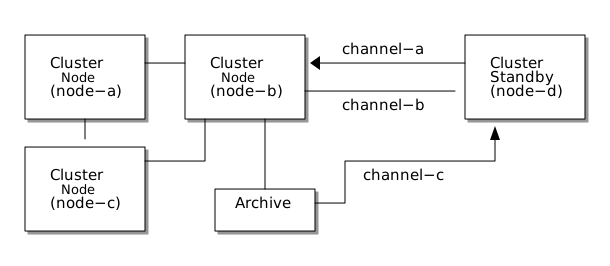
Let’s look a typical standby style setup for a single Cluster Standby
node. We have a cluster formed by node-a node-b and node-c. These
will all be running instances of the Consensus Module, one or more
Clustered Services containers and an Archive. Obviously, all nodes will
be running a Media Driver. For the purposes of this, we are going to
look at how we configure node-d which is a Cluster Standby connected
directory to the cluster. With regard to clusterMemberId, we will use
the following assignments:
| Node | clusterMemberId |
|---|---|
node-a |
0 |
node-b |
1 |
node-c |
2 |
node-d |
3 |
-
channel-awill carry the backup queries sent from the standby node to the cluster. Backup queries are how the standby nodes discovery the configuration of the cluster, e.g. archive endpoints for replay. Authentication information including challenge responses will go via this channel. -
channel-bwill carry responses to the backup queries as well as authentication challenges. -
channel-cis the replay channel used to receive log data from the archive.
The key information in this configuration section the application of the
appropriate hosts, values like the port part of the endpoint
configuration have been given as examples and vary depending on your
environment. The exception here will be the use of port 0 to indicate
where a system assigned ephemeral port can be used. This documentation
will focus on the configuration of the endpoints used for communication.
Please see the sample support code to configure the rest of the options.
Main Cluster node-a, node-b, node-c
This is the main place where the configuration of the cluster nodes and the standby nodes overlap. The remaining configuration options for the main cluster have been left out for brevity.
API
final String clusterMembers =
    "0,node-a:20000,node-a:20001,node-a:20002,node-a:20003,node-a:20004|" +
    "1,node-b:20100,node-b:20101,node-b:20102,node-b:20103,node-b:20104|" +
    "2,node-c:20200,node-c:20201,node-c:20202,node-c:20203,node-c:20204|";

final ConsensusModule.Context context = new ConsensusModule.Context()
.clusterMembers(clusterMembers);Standby: node-d
This configuration will be specific to the nodes connecting directly to
the cluster, in this case node-d.
-
We need to set the
clusterConsensusEndpoints, this will manage the endpoints forchannel-a, this is a comma-separated list of endpoints so that it can handle some faults within the cluster. -
We then need to set the
responseEndpoint. This is the endpoint for return flow back to the standby onchannel-b(backup responses) andchannel-c(cluster log replay). Note that the host name matches the name of the current node, this must resolve to an address that is bound to the local node, but is also reachable from the main cluster. Port0can be used here to have an ephemeral port be selected by the system.
API
final ClusterStandby.Context context = new ClusterStandby.Context()
    .clusterConsensusEndpoints("node-a:20001,node-b:20101,node-c:20201")
    .clusterMemberId(3)
    .responseEndpoint("node-d:0")
    .standbyConsensusEndpoint("node-d:20301")
    .standbyArchiveEndpoint("node-d:20304")
    .responseEndpoint;
Properties
aeron.cluster.consensus.endpoints=node-a:20001,node-b:20101,node-c:20201
aeron.cluster.standby.response.endpoint=node-d:0
aeron.cluster.standby.consensus.endpoint=node-d:20301
aeron.cluster.standby.archive.endpoint=node-d:20304
aeron.cluster.member.id=3
Note: Response Ports
One of the things that is common in various Aeron configuration is the
response port setting. Often a wildcard port (:0) is used so that the
system can assign an ephemeral port. In fact for Cluster Standby the
responseEndpoint must use a wildcard. In some cases this is not
desirable as it may be necessary to have a fixed set of port, especially
in situations where that set of ports needs to be narrowed, e.g. during
firewall configuration. If fixed ports are required for use with Cluster
Standby, then multiple endpoint settings need to be applied, e.g.
final ClusterStandby.Context context = new ClusterStandby.Context()
    .clusterConsensusEndpoints("node-a:20001,node-b:20101,node-c:20201")
    .clusterMemberId(3)
//    .responseEndpoint("node-d:0")
    .catchupEndpoint("node-d:20307")
    .clusterConsensusResponseEndpoint("node-d:20308")
    .clusterArchiveResponseEndpoint("node-d:20309")
    .standbyConsensusEndpoint("node-d:20301")
    .standbyArchiveEndpoint("node-d:20304")
    .responseEndpoint;
The configuration options catupEndpoint,
clusterConsensusResponseEndpoint, and clusterArchiveResponseEndpoint
will need to be set. If any of these are not set it will default back to
the responseEndpoint setting. The values for those three configuration
options can not be the same as they may use different channel transport
configuration options and could result in clashing configuration.
Creating Cluster Standby
The configuration outlined above is to support basic setup and
replication between the cluster and standby nodes. To provision a node
to consume messages and take standby snapshots launch a ClusterStandby.
final ClusterStandby standbyNode = ClusterStandby.launch(standbyCtx);Cluster Standby Snapshots
One of other features provided by Cluster Standby is the ability to take
snapshots on a Cluster Standby node, but leave the main cluster running
without interruption. Standby snapshots still need to be triggered on
the leader node. This is done by using the PremiumClusterTool (see the
section below on `Taking Standby Snapshots'). However, we don’t want to
have Standby Snapshots triggered on all possible services, therefore
some additional configuration is required to support standby snapshots.
Firstly we need to enable Standby snapshot on the nodes that we want to
take snapshots. This may not be all nodes, especially if there are nodes
that are not running the exact same services as the main cluster.
Secondly we need to configure the main cluster to accept snapshots from
the standby. These configuration options default to false.
final ClusterStandby.Context standbyContext = new ClusterStandby.Context()
    .standbySnapshotsEnabled(true)
    .standbySnapshotNotificationsEnabled(true);

final ConsensusModule.Context consensusModulecontext = new ConsensusModule.Context()
    .acceptStandbySnapshots(true);
# Standby
aeron.cluster.standby.snapshot.enabled=true
aeron.cluster.standby.snapshot.notifications.enabled=true
# Cluster Nodes
aeron.cluster.accept.standby.snapshots=trueWhen a Standby Snapshot is taken it will be stored on the Standby node and a message will be sent to the members of the cluster notifying them of the new snapshot and the endpoint of the Archive where the snapshot is located. Snapshots are not immediately replicated up to the main cluster. When a Cluster node recovers it will check to see if there are any Standby snapshots that it is aware of that are newer that the snapshots stored locally. The Cluster node will attempt to replicate the snapshot from the Standby node before starting the snapshot load and log replay. If necessary it is possible to replicate the snapshots from the Standby on demand in case there a reason why we don’t want the replication to occur during restart. See the section below on `Replicating Standby Snapshots' on how to do this.
PremiumClusterTool
In order to access a few of the premium features we have introduced a
new command line tool called PremiumClusterTool. This replaces the
existing ClusterTool by including all the functionality of the Open
Source version with the addition of the few premium Cluster Standby
features.
Taking Standby Snapshots
Standby snapshots still need to be triggered on the leader of the
cluster as the instruction to take the snapshot still needs to be stored
in the log. We have added the functionality to the PremiumClusterTool
to trigger the Standby snapshot, this will need to be run against the
leader node of the cluster in order to work.
$ java -cp <aeron-all jar>:<aeron-cluster-standby jar> io.aeron.cluster.PremiumClusterTool \
  /path/to/cluster/dir \
  standby-snapshot
Replicating Standby Snapshots
If there are cases were it is advantageous to replicate a snapshot from
the Standby to the Cluster node ahead of time so that the replication
doesn’t occur during the restart. This can also be done using the
PremiumClusterTool.
$ java -cp <aeron-all jar>:<aeron-cluster-standby jar> io.aeron.cluster.PremiumClusterTool \
  /path/to/cluster/dir \
  replicate-standby-snapshot
Features of Warm DR Transition Nodes
Transitioning Nodes
There are two ways to transition a node from a standby to a consensus module.
First is by sending a TransitionNode message to the transition module to programmatically trigger
the transition.
Second is via a command line tool that can be run with the following command:
$ java -cp <aeron-all jar>:<aeron-cluster-standby jar> io.aeron.cluster.PremiumClusterTool \
  /path/to/transition/dir \
  transition \
  60s
Restoring back to a Primary Cluster
If Cluster Standby is being used to provide a disaster recovery capability and there has been an incident necessitating a transition to a secondary cluster, there will likely be a point where it is desirable to fail back to the location of the original primary cluster. In this situation some care will be required. Before considering doing this a few actions outside the scope of Aeron Cluster need to first be considered.
-
Has the disaster been resolved? Clearly it is necessary to ensure that it is actually possible to provision a cluster in the original location. This may not be possible in some situations, e.g. earthquake.
-
After failing over to the secondary cluster, have all the necessary organisation/business actions taken place. Because replication to a standby cluster is asynchronous, there is a high chance of data loss. Therefore, it is likely that some action need to be taken outside the system to resolve that situation. An example of this is with an exchange, some of the trades that occurred in the primary system did not get replicated to the standby and will need to be reversed in collaboration with the counterparties and clearing houses/prime brokers. This is because, after a transition to a new cluster, that system now provides the source of truth for the organisation.
-
In light of the above, before failing back to the original data center, the old cluster’s data (if it is even reachable), should be archived away from the primary cluster.
-
A new standby cluster should be provisioned and set up to replicate data from the secondary.
-
At an appropriate time, shutdown the secondary cluster and transition the primary one from standby to live.
Replacing a Single Node
One of the other features that Cluster Standby supports is the ability for a standby node to replace and existing cluster node after it has failed. If we set up a 3-node cluster and a 4th node as a standby, specifically using the transition module configuration for the standby. When configuring the transition module’s consensus module, unlike the DR scenario, it should use the same cluster member information as the rest of the cluster. This is so that when the standby node gets transitions it can take over the configuration from one of the existing nodes.

If we assume that cluster nodes node-a, node-b and node-c have
cluster member ids of 0, 1 and 2 respectively. In order to make it
possible to allow the standby to replace one of the cluster members is
necessary to configure the cluster members to use a host name instead of
an IP address. This is so that when we start the new node it will be
assuming the host name of the node that failed. Therefore, some
administrative actions are required to update the host name to IP
address mapping so that the host name of the failed node now resolves to
the IP address of the Cluster Standby node. The Aeron Media Driver
supports
pluggable
name resolution, so this can be done via DNS, maintaining local
/etc/hosts files or using a custom name resolver implementation
configured on the Media Drivers.
Given the above setup is adhered to, then the process for replacing a
node with a standby is as follows. We will assume that node-b is the
node that has failed.
-
Ensure that the instance/machine hosting
node-bis stopped. -
If
node-bwas the leader, wait until the remaining nodes have elected a new leader. -
Update the appropriate naming service to repoint the name of
node-bto the IP address ofnode-d. -
Use the Premium Cluster Tool to transition
node-dto be a full member. Run the following command using the PremiumClusterTool onnode-d
$ java -cp <aeron-all jar>:<aeron-cluster-standby jar> io.aeron.cluster.PremiumClusterTool \
  /path/to/cluster/dir transition-as-member 1 60s
With this command we are telling the standby to assume the roll of
cluster member id 1.
Authorisation
To allow Standby nodes to interact with the primary cluster, the consensus module on the primary cluster nodes must be configured to allow the necessary calls. For normal Standby operation, this includes Backup Queries and Heartbeats. To support standby snapshots, the Standby Snapshot notification must also be allowed.
To allow these calls, the Consensus Module must be configured with an AuthorisationService that allows at least the
following:
MessageHeaderDecoder.SCHEMA_ID == protocolId &&
    (BackupQueryDecoder.TEMPLATE_ID == actionId ||
     HeartbeatRequestDecoder.TEMPLATE_ID == actionId ||
     StandbySnapshotDecoder.TEMPLATE_ID == actionId)
For more details, see the Javadoc for
io.aeron.cluster.ConsensusModule.Context.authorisationServiceSupplier(io.aeron.security.AuthorisationServiceSupplier)
From Aeron 1.49.0, the default authorisation service allows these requests.